




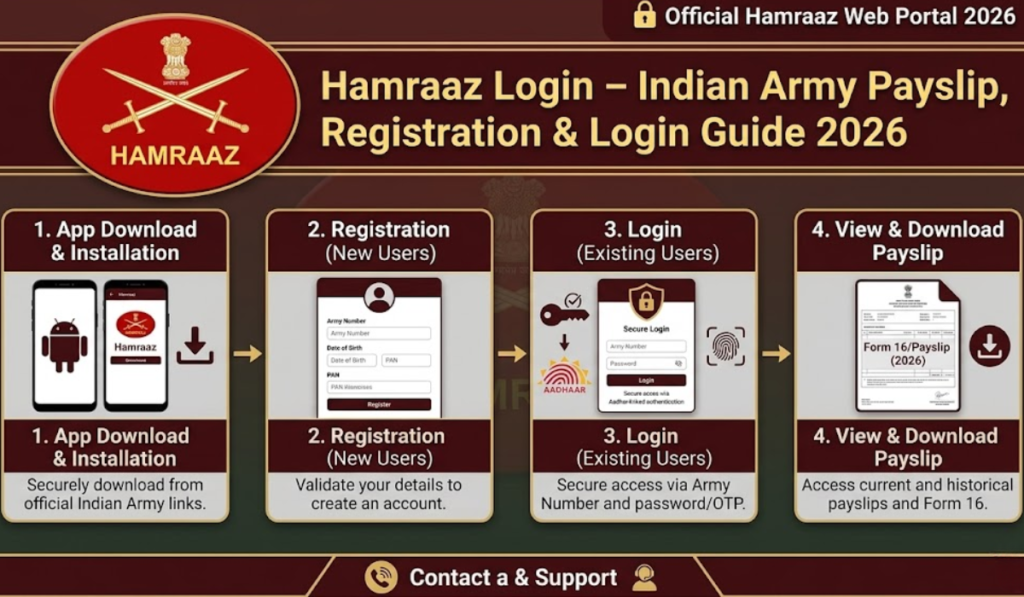
The most significant digital platform for Indian Army personnel is the Hamraaz login portal. The Hamraaz app and the web portal were introduced by the Indian Army to simplify administrative work, enabling soldiers, officers, and their families to easily view their salary slips, service records, etc. The modern-day armed forces are well-connected virtually, irrespective of whether you are a serving soldier or a retired veteran; it is necessary to understand the Hamraaz login in order to be able to log in seamlessly.
In this ultimate guide, we will assist you in understanding everything about Hamraaz login, starting with registration, troubleshooting, features and general questions.
What Is Hamraaz?
Hamraaz, which is a Hindi term for “confidant” or “trusted companion,” is a mobile and web application that the Indian Army developed by its own manpower. The platform is designed to make payslips, service documents, pension and other administrative information accessible online for army personnel. Salaries were previously facilitated with soldiers having to visit their pay offices physically or the officers relying on paper-based correspondence.
Well, here lies the gap which the Hamraaz Login Portal fills with its secure and centralised digital system! Hamraaz is used by millions of Indian Army personnel to view monthly salary information, annual income tax statements, and personal records from their smartphone or computer. With Payslip Personal Login Hamraaz, eligible personnel can securely access their salary details and payslip information online without depending on physical documents.
Read Also: UPSI Vacancy 2026 – Notification, Eligibility, Apply Online
Key Features of Hamraaz Portal
The Hamraaz login system has a wide spectrum of characteristics intended especially for soldiers. Below you will find an overview of the most relevant functionalities available by logging on to your account:
| Feature | Description |
| Salary Slip Download | View and download monthly pay slips in PDF format |
| Annual Income Tax Statement | Access Form 16 and IT statements for tax filing |
| Service Record | View complete service history and postings |
| Family Details | Update and view family member information |
| Pension Details | Check pension status for retired personnel |
| Leave Management | Apply and track leave applications |
| Grievance Redressal | Submit complaints and track resolution |
| Document Upload | Upload personal documents for administrative use |
| Notifications | Receive important circulars and announcements |
How to Register on Hamraaz
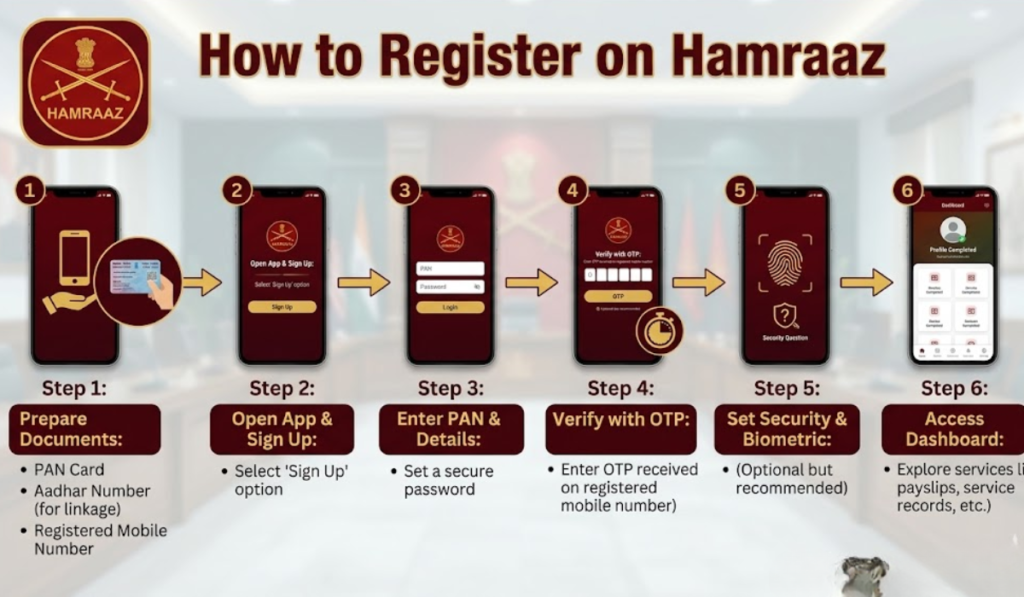
To access the Hamraaz login portal, you will have to first complete the registration process. Excelsior Correspondent JAMMU, Jan 1: Registration is open for serving and retired Indian Army personnel only. Here’s a step-by-step breakdown:
Step 1: Download the Hamraaz app from the Google Play Store on your Android. As of now, the app is still not available on iOS, so iPhone users have to use the web portal.
Step 2: Go to the app, click on New Registration or Sign Up on the home page.
Step 3: Fill in your (Service number) or Army Number of the entry.
Step 4: Fill in your date of birth and other details wherever asked. They must be the same as your official army records
Step 5: The Hamraaz login account password also needs to be a strong password. Registration: The password should be strong according to the strength guidelines described on your registration page.
Step 6: OTP verify your mobile number. Make sure the mobile number you enter is the one registered against your unit.
Step 7: Once the OTP has been verified properly, your Hamraaz account will be generated, which you can log into.
Hamraaz Login: Step-by-Step Process
The process of logging in to Hamraaz is very simple once you have registered. Follow these steps:
Step 1: Access the Hamraaz application using your Android mobile phone and land on the official web portal.
Stage Two: Enter your Army Number in the field on the login screen,
Step 3: Enter the password that you registered with.
Step 4: If two-factor authentication is on, enter the OTP sent to your registered mobile number.
Step 5: Click on the Login Button
Step 6: On completing the Hamraaz login, you shall be taken to your unique dashboard that will reveal every function on the app.
Read Also: SPG Commando Salary in India: Pay Scale, Benefits, and Eligibility
Hamraaz Login Portal vs Mobile App: A Comparison
There are two main ways to log in to Hamraaz: either through the official web portal or through the Hamraaz app. Here’s a handy comparison to pick the right one for you:
| Parameter | Hamraaz Web Portal | Hamraaz Mobile App |
| Platform | Desktop and laptop browsers | Android smartphones |
| iOS Support | Yes (via browser) | No |
| Download Required | No | Yes (Google Play Store) |
| Internet Required | Yes | Yes |
| Offline Access | No | No |
| User Interface | Standard web interface | Mobile-optimised UI |
| Push Notifications | No | Yes |
| Ease of Document Download | Moderate | High |
| Recommended For | Detailed document viewing | Daily usage and alerts |
Common Hamraaz Login Problems and Solutions
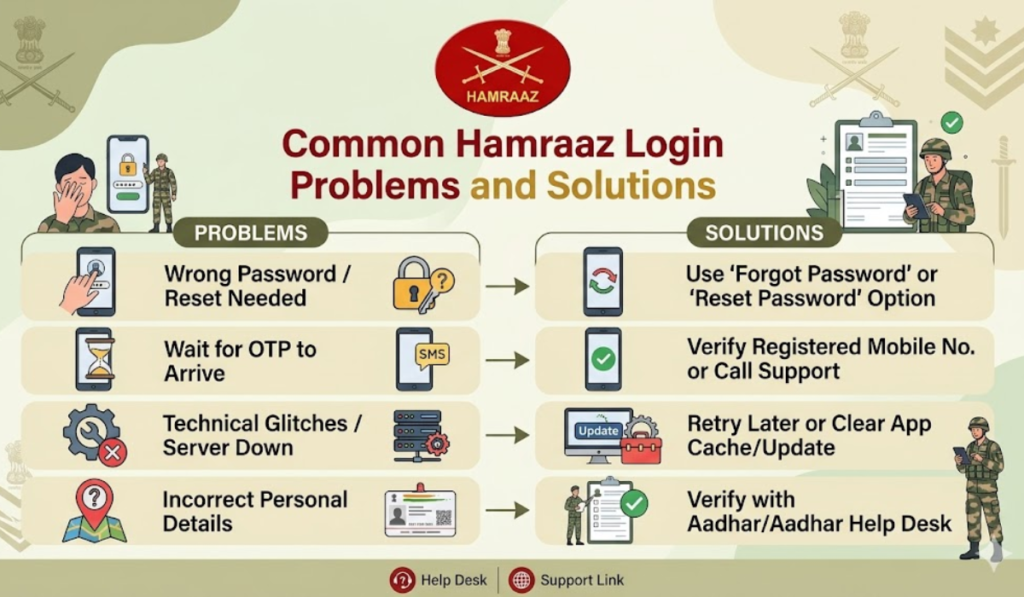
However, there are many users who face issues accessing the Hamraaz login. Below are the common problems and their respective solutions:
- Problem 1: Forgotten Password. If you forget the login password of Hamraaz, use the forgotten password option on your login screen. In case you want to reset your password, you will require your Army Number and identity verification through OTP.
- Problem 2: OTP Not Received. If you do not receive OTP on your mobile, then first verify that your mobile number is correctly registered in the unit. Also, make sure your phone is connected to the Network. If the problem continues, follow up with your unit’s administrative office.
- Problem 3: Account Locked. Your Hamraaz account may lock you out after some failed sign-in attempts. Wait it out for 24 hours and then again, or get in touch with Hamraaz helpline.
- Problem 4: Hamraaz App not Working is the app or loading problem, and the Hamraaz app crashes; in such a case, first clear the cache of this app from your phone settings. If the problem persists, uninstall and install it again: download & install the latest version from the Play Store.
- Problem 5: Invalid army number. When you enter the Army Number, it should not have space and any special characters. This format has to be exactly what is recorded in official army documents.
How to Download Salary Slip via Hamraaz Login
Deposit Salary Slips. One key feature extensively used via the Hamraaz login portal is the option to download your monthly salary slips. Here’s how:
- Hamraaz Login: Log in to the Hamraaz by entering your Army Number and password
- Go to the Pay Slip or Salary Details option in the dashboard menu
- Choose the month and year of the salary slip you want to download.
- Your payslip will be displayed on your screen in PDF format.
- Click download, and this will save the file on your device.
- We can get the official or even personal use of this salary slip printed out.
Hamraaz for Retired Army Personnel
Pension-related information can also be accessed by retired army personnel through the Hamraaz login portal. Veterans Retiring, the platform teaches retired veterans:
- Check the monthly pension disbursement details
- View arrears and pension revisions
- Download Pension Slips and the annual statement
- Access medical reimbursement details
- Another boon is that you may file complaints in relation to pension disparities
The Hamraaz login allows the pensioners to remain aware of their entitlements without having to visit places like PCDA (Principal Controller of Defence Accounts) offices in person.
Read Also: 4 LPA In Hand Salary: Monthly Income, Deductions & Take Home
Security Features of Hamraaz Login
Due to the sensitive nature of information processed through the Hamraaz portal, it encompasses several security protocols:
| Security Feature | Details |
| Two-Factor Authentication (2FA) | OTP verification on login |
| Session Timeout | Automatic logout after inactivity |
| End-to-End Encryption | Data transmission is encrypted |
| Password Policy | Mandatory strong password requirements |
| Login Attempt Limit | Account locks after multiple failed attempts |
| Secure Server | Data hosted on the Indian Army’s secure servers |
The document can be secured by means of a device, but personnel shouldn’t share their Hamraaz login ID and password with anyone, even unit mates. The IT cell of the units will have to report immediately in case they find any unauthorised access made.
Hamraaz Helpline and Support
If you can’t fix your Hamraaz login issue using self-service options, reach out to the following support channels.
- Email Support: For providing the login and account-related support, you need to get in touch with your respective PCDA office. Your unit’s IT department can help you with registration and account issues.
- Helpline Number: The Indian Army releases helpline numbers for Hamraaz and disburses them through official communication lines.
- In-App Help: The Hamraaz app provides a help section with FAQs and a contact form to submit queries.
Tips for a Smooth Hamraaz Login Experience
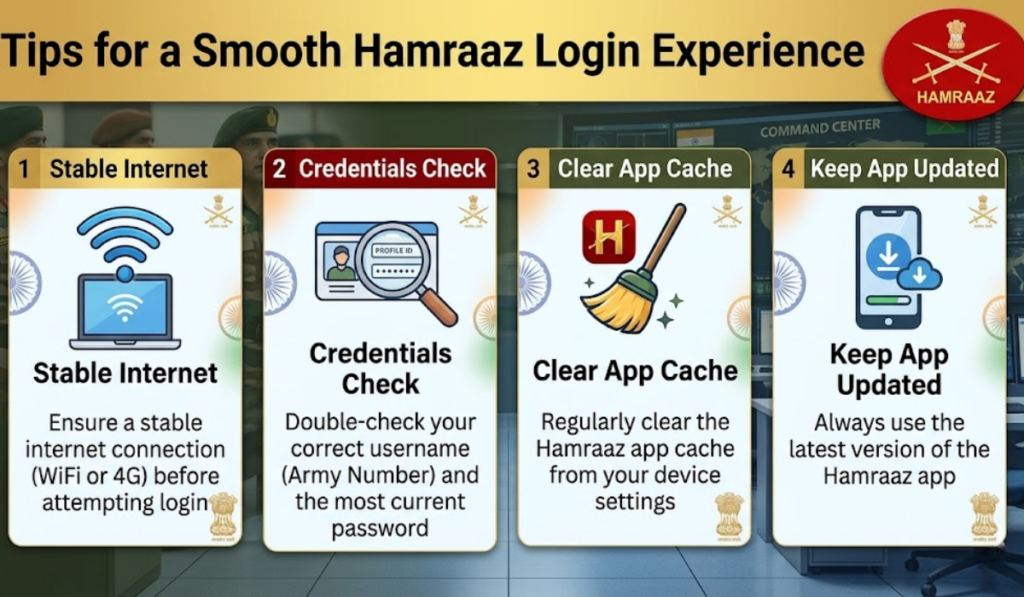
However, keep in mind the following best practices so that you always have a smooth Hamraaz login experience:
- Ensure that your registered mobile number is active and updated with your unit.
- Always use the latest version of the Hamraaz app.
- Use a unique password to give you access; change it from time to time.
- Always log out of your account after use, particularly if using shared devices.
- Make sure your internet connection is working before trying to log in.
- Do not use unofficial versions or third-party apps of the Hamraaz app.
- Always install the app from the Google Play Store, not somewhere else.
Read Also: RRB Group D Exam Date 2026
Frequently Asked Questions (FAQ)
Q1. What is the Hamraaz Login Portal?
Purpose of the Hamraaz Portal Another type of Hamraaz Login Portal is an official Indian Army portal that allows army personnel and retired army personnel to log in with their credentials to access salary slips, pension details, service records, income tax statements and other admin information.
Q2. Who uses the Hamraaz Login System?
Hamraaz login film is only available for Indian Army personnel – serving soldiers/officers as well as veterans. It does not allow independent login access to family members.
Q3. Hamraaz App iPhone: Is the Hamraaz App Available for iOS (iPhone) Users?
Currently, the Hamraaz mobile app is available only for Android on the Google Play Store. The Hamraaz is also available to iPhone users via an official web portal (supporting all browsers).
Q4. My Hamraaz login password if I forget it?
On the Hamraaz login screen, click or tap “Forgot Password”. To reset your password, you will need to enter your Army Number and validate it through OTP.
Q5. Is Hamraaz login free to use?
Step 1: Log in to your Hamraaz account. Step 2: Navigate to the downloads section. Once you are logged into Hamraaz, go to the Pay Slip section, choose a month and year and download your salary slip as a PDF.
Q6. Can the hamraaz be accessed by retired army personnel?
The answer is Yes; the pensioners and retired army personnel can use the Hamraaz login portal to check their pension slip, arrears details, medical reimbursement information, and even file a grievance related to their pension.
Q7. If I Want to Unlock My Hamraaz Login Account?
In case your account gets locked from several failed login attempts, simply wait for 24 h get access to your account again. In case the issue persists, get in touch with IT cell of your unit or the concerned PCDA office.
Q8. Is my data safe on Hamraaz?
Yes, the Hamraaz login portal follows various protocols of end-to-end encryption along with two-factor authentication, ensuring that data on their site is protected to the full extent.
Q9. How to Change the Mobile Number in Hamraaz?
First, go to your unit Admin Office or pay office and change /update your mobile number. Before it can be updated on the Hamraaz platform, personal data will have to be checked via the official channel with regard to any changes.
Conclusion
At a larger scale, the Hamraaz login portal is an innovation point for the digital journey in the Indian Army. It enables the personnel to securely and conveniently access important financial and administrative information without them having to visit pay offices, which are both time-consuming and cumbersome. Whether it is a download of the monthly salary slips or checking details related to pensions, and more, the Hamraaz login platform comes packed with almost everything that can make life easier for lakhs of army personnel in India.
You will need to know the Hamraaz login guide details, even if you are a newcomer who has been recruited here for the first time or a retired veteran seeking access to your pension information. With credentials secured, stay updated with the latest version of the app and utilise this amazing tool developed exclusively for veterans of the Indian Army.

Prashant Kumar is the dedicated content writer and salary research author at TheMonthlySalary.com. He specializes in creating clear, helpful, and easy-to-understand content about monthly salary, in-hand pay, salary calculators, career growth, and salary updates. My goal is to simplify salary-related topics for employees, job seekers, students, and working professionals. Through well-researched guides and practical insights, Prashant helps readers make smarter career and financial decisions.